Get the Kit – ₹399
⚡ Built for coaching, tuition & skill institutes

Your whole institute.
One Excel command centre.

See every enquiry, every fee and every pending rupee on one screen. The Institute Growth & Operations Kit replaces registers, WhatsApp notes and scattered files with 15 connected sheets.

₹399Launch price · one-time
♾️ Lifetime access · Pay once, use forever · No renewal

Works in Excel · Opens in Google Sheets too (step-by-step guide included) · No subscription · 5 files sent to your email

Owner_Dashboard
Enquiries48
Collected₹1.24L
Overdue₹38K
Aarav S.Paid
Riya V.Overdue
Fee Manager
Collected₹1.24L
Pending₹38K
Aarav S.Paid
Riya V.Due
Kabir S.Soon
Send reminder
DigiInfo
Institute
Growth &
Operations Kit
Enquiry to fee collection.
One workbook.
15 SHEETS · EXCEL
INSTITUTE GROWTH & OPERATIONS KIT
What's inside the kit
  • 📊
    Owner DashboardFees collected, overdue and admissions on one screen
  • 🎯
    Enquiry to Admission FunnelTrack every lead, follow-up and joining
  • 💰
    Fee ManagerInstalments, dues and balance for every student
  • 🔔
    Defaulters ListSee who has not paid and follow up fast
  • 🧾
    Fee ReceiptsReady-to-print receipt for each payment
  • 🗓️
    Attendance and BatchesDaily attendance with batch-wise records
  • 👨‍🏫
    Staff Payroll and ExpensesSalaries and monthly spending in one place
  • 📘
    Setup Guide and SOP PackPlus a sample-data file to learn from
Fees collected (sample)₹1,24,500
Overdue alerts9 students
Owner_Dashboard.xlsx
DigiInfo
Owner_Dashboard
Enquiries
Funnel
Students
Fee_Manager
Defaulters
Attendance
Payroll
Enquiries48▲12%
Admissions21▲8%
Collected₹1.24L
Overdue₹38K

Monthly fee collection

Fee status

Aarav S.Batch APaid
Riya V.Batch BOverdue
Kabir S.Batch ADue soon
Neha P.Batch CPaid

Illustrative preview with sample data. Your workbook starts blank, or with the sample file.

15connected sheets
4files in the kit
1×one-time payment
0monthly fees
Sound familiar?

Running an institute should not mean running after information

“Kitne enquiry aaye, kitne join hue?”

Enquiries sit in phone calls, notebooks and WhatsApp. Nobody knows the real conversion.

“Is mahine kiski fees baaki hai?”

The fee register is updated when someone remembers. Follow-ups happen late, or not at all.

Attendance, batches and salary in 3 places

Every month-end becomes a reconstruction exercise.

Owner depends on staff for every number

To answer “how many students do we have?”, someone has to sit and count.

See it in action

Everything you need, connected

Enter a student once. Fees, dues, attendance and batch lists update from the same record.

Fee control

Know exactly who owes what, and for how long

Fee Manager tracks instalments per student. Defaulters lists everyone overdue with days late, so follow-up starts on time.

  • Fee structure and instalments per student
  • Automatic overdue and balance view
  • Ready receipt for every payment

Fee_Manager SAMPLE DATA

Aarav Sharma₹12,000 · PaidClear
Riya Verma₹4,000 due · 12 daysOverdue
Kabir Singh₹3,000 due · in 3 daysDue soon
Neha Patel₹10,500 · PaidClear
Dev Mishra₹6,000 due · 21 daysOverdue
Admissions

See exactly where enquiries are lost

Log every enquiry by source and course, then watch it move from enquiry to visit to admission.

  • Source, course and status per enquiry
  • Stage-by-stage conversion funnel
  • Know which source brings real admissions

Funnel SAMPLE DATA

Enquiries48
Contacted39
Visited27
Admitted21
Daily operations

Attendance, batches and payroll in the same file

Mark attendance by batch, keep staff payroll ready each month and record expenses beside fee income.

  • Daily attendance by batch
  • Staff list and monthly payroll
  • Expenses by category

Attendance · Batch A SAMPLE DATA

Aarav
Riya
Kabir
Neha
Before vs after

Monday morning, two ways

Without a system

  • Open 4 files and 2 WhatsApp groups to find who has not paid
  • Ask staff for the enquiry count
  • Guess which batch is full
  • Calculate salary at month-end on a calculator

With the kit

  • Open Owner_Dashboard. Collected, pending and overdue are on one screen
  • Enquiry funnel shows conversion by stage
  • Batch strength is already counted
  • Payroll sheet is ready to calculate
Parent · Fee reminder
Namaste Mr. Verma, this is a friendly reminder that Riya's April instalment of ₹4,000 was due on 5 May. Kindly pay at your earliest convenience. Thank you, ABC Institute.
Sure, will pay tomorrow.
Example message from the Fee Recovery add-on
Follow-ups made easy

Know who to remind, and what to say

The kit shows who is overdue and by how many days. The optional Fee Recovery add-on gives you ready, polite messages for parents at every stage.

All 15 sheets

One workbook. Fifteen sheets. Zero chaos.

Start_HereOwner_DashboardFee_ManagerEnquiriesFunnelStudentsStudent_ProfilePaymentsDefaultersReceiptBatchesAttendanceStaff_PayrollExpensesSettings
Features

Everything a small institute needs, nothing it does not

📊

Owner Dashboard

Enquiries, students, collection and dues on one screen.

🎯

Enquiry Funnel

Track every enquiry from first call to admission.

💰

Fee Manager

Fee structure and instalments for every student.

⏰

Defaulters list

See who is overdue and by how many days.

🧾

Receipt format

A ready receipt for each payment you record.

🗓️

Batch attendance

Daily attendance with batch-wise lists.

👥

Staff payroll

Staff records and monthly payroll in one sheet.

⚙️

Settings-driven

Set your institute name and fees once. Sheets follow.

Receipt
FEE RECEIPT
StudentRiya Verma
BatchB · Science
Paid₹4,000
ModeUPI
Balance₹0
Student_Profile
RV
Riya VermaBatch B · Science
Fee paid
Attendance
Staff_Payroll
Teacher A26 days₹18,000
Teacher B24 days₹15,500
Counsellor26 days₹12,000
Helper25 days₹7,500

Illustrative previews with sample data.

What you receive

4 files, delivered together

XLSXBLANK
Workbook
XLSXSAMPLE DATA
Workbook
PDFSetup
Guide
PDFSOP
Pack
1
BLANK workbook (.xlsx)The full kit with empty sheets, ready for your data.
2
SAMPLE DATA workbook (.xlsx)The same kit filled with example data, so you see every sheet working first.
3
Setup Guide (PDF)Step-by-step instructions to set it up for your institute.
4
SOP Pack (PDF)Everyday operating routines to run with the workbook.
Who can use it

If you run an institute, this is for you

Any small institute that manages students, batches and fees.

🎓

Coaching centres

School, college and entrance-exam batches

💻

Computer & skill institutes

Courses, certificates and monthly batches

📚

Tuition centres

Subject batches with monthly fee cycles

🎨

Art, music & dance classes

Hobby batches with instalment fees

🗣️

Language & spoken English

Short courses with rolling admissions

🎬

Design & animation institutes

Longer courses with staged payments

It is perfect when you

  • Run the institute yourself or with 1–2 staff
  • Track fees on paper, WhatsApp or scattered Excel files
  • Want to see dues and enquiries without asking anyone
  • Do not want a monthly software subscription
  • Already use Microsoft Excel on a laptop or PC
Get Instant Access – ₹399
Is this for you?

Built for the way a small Indian institute really runs

This kit fits if you

  • Run a coaching centre, computer or skill institute, hobby class or tuition centre
  • Manage students, batches and fees yourself or with one or two staff
  • Still keep records on paper or WhatsApp and want them in one place
  • Want clear fee, dues and attendance tracking without building a system

It is not for you if you

  • Want a mobile app or a website. This is an Excel workbook plus PDF guides
  • Run many branches on separate systems
  • Need many people editing the same live file at once
Simple setup

Up and running in 3 steps

1

Download

Your files are delivered right after payment.

2

Explore

Open the SAMPLE file first to see how each sheet works, then open the BLANK file in desktop Excel.

3

Enter your data

Fill Settings, then Enquiries and Students. Everything else follows from there.

Desktop Microsoft Excel is recommended. The workbook uses formulas and formatting that desktop Excel handles best.

Ready-to-send WhatsApp messages

Reply faster. Collect fees without awkward calls.

Pick a message, fill in the name and send. These are sample messages from the add-on packs you can choose at checkout.

Real screens from inside the kit

See exactly what you get

Not artwork. These are screens from the SAMPLE DATA workbook included in your download.
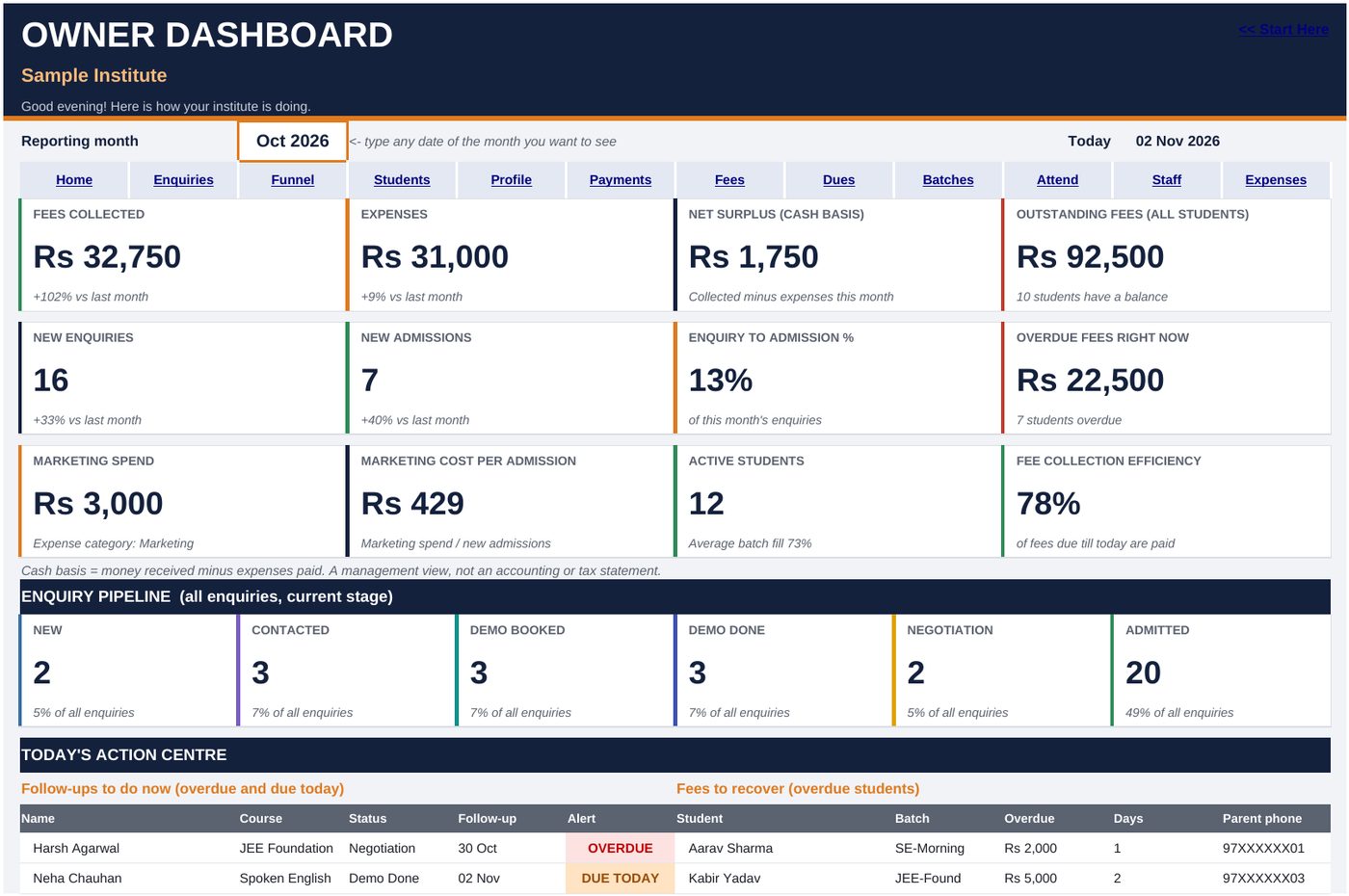
Owner Dashboard sheet showing fees collected, expenses, enquiries and overdue fees

Owner Dashboard. Fees, expenses, new enquiries and overdue fees on one screen, plus today's follow-ups and fees to recover.
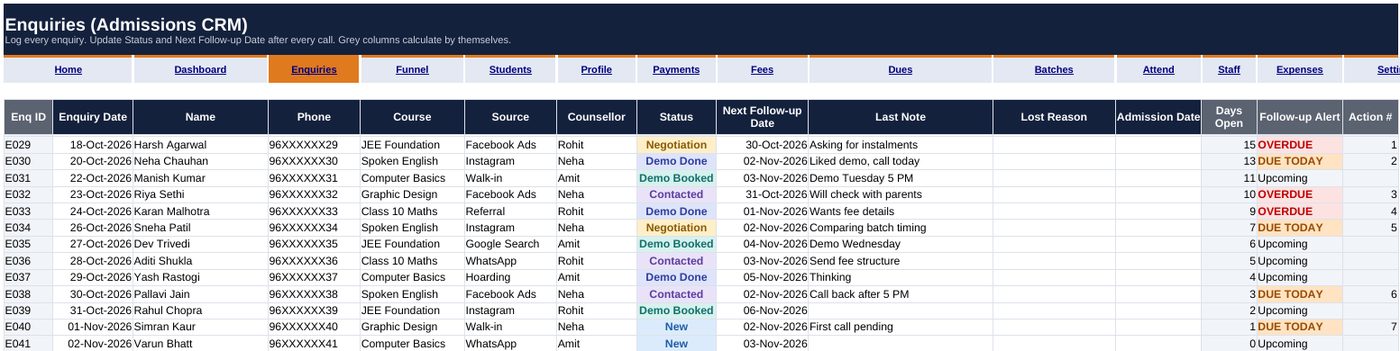
Enquiries (Admissions CRM)
Enquiries sheet with status colours and follow-up alerts

Admissions CRM. Status colours and OVERDUE or DUE TODAY alerts tell you whom to call first.
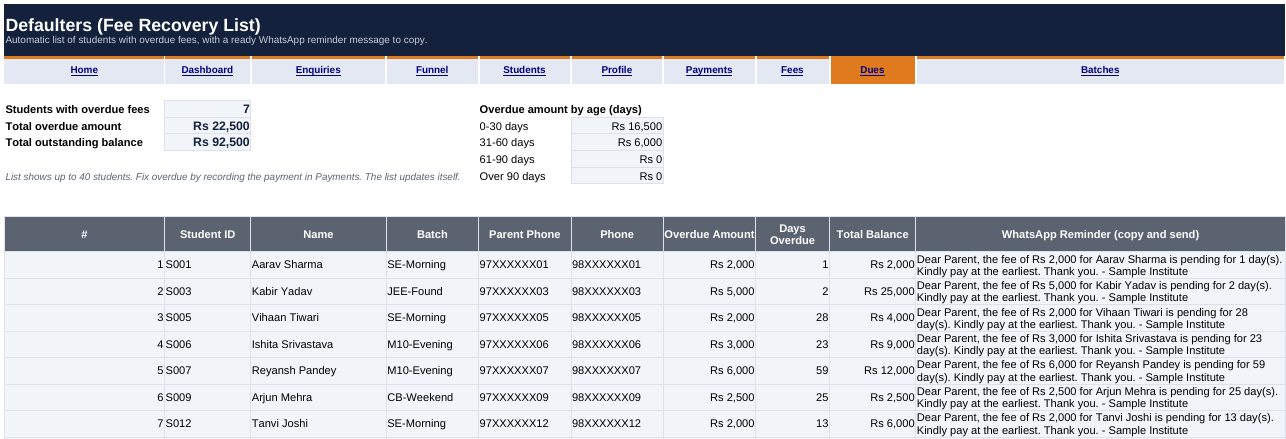
Defaulters (Fee Recovery List)
Defaulters sheet with overdue fees and a ready WhatsApp reminder message

Fee recovery list. Overdue students appear automatically, each with a ready WhatsApp reminder to copy.
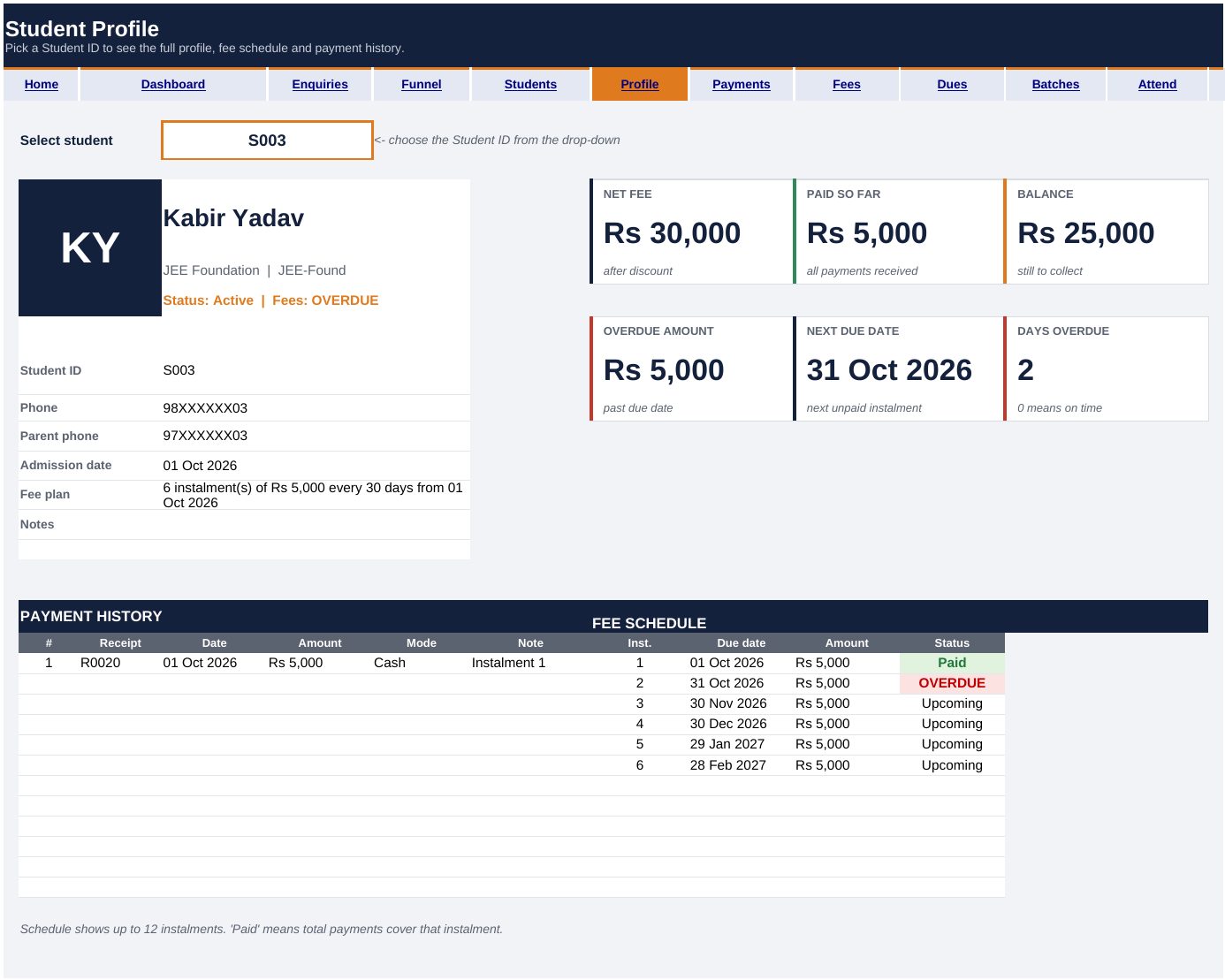
Student Profile sheet with fee schedule and payment history

Student Profile. Pick a Student ID to see the fee schedule, payments made and balance.
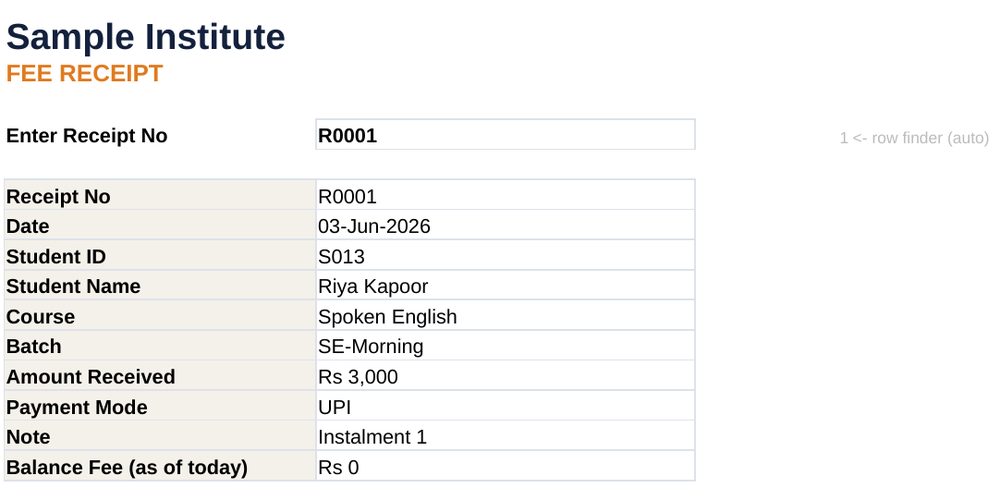
Print readyFee receipt sheet

Fee receipt. Choose a receipt number and print a clean receipt for the parent.

All screens use sample data (Sample Institute, example names and masked phone numbers). Your BLANK workbook starts empty for your own data.

Why this kit

Free sheets, monthly apps, or one complete system

Free small templates

Separate files for fees, attendance and forms. Good to start, but nothing is connected, so you still add things up by hand.

Monthly software

Powerful, but you pay every month and your data lives on someone else's app. Many small institutes do not need all of it.

Digi Info Growth Kit

15 connected Excel sheets, dashboard, fee dues and defaulters, receipts, payroll, setup guide and SOP pack. Pay once, keep it on your own computer, no internet needed.

More files is not the same as a better system

Some low-priced toolkits give you dozens of separate files. You still copy the same student name and fee into each one. This kit is built around one daily flow, so you enter it once and the sheets update together.

  • ✓ One flow: enquiry, admission, fee, due, receipt, attendance, payroll
  • ✓ Sample data file so you see it working before you type anything
  • ✓ Setup Guide and SOP Pack so your staff know the daily routine
  • ✓ Honest page: no made-up reviews or fake sales popups. Real reviews will be added as customers share them.

Fee dues and WhatsApp reminders: the Defaulters sheet shows who owes what, so you can follow up in minutes, not hours.

Get Instant Access →
Your offer

Get the complete kit for ₹399

One-time payment. Instant delivery. Yours to use for your institute.

Institute Growth & Operations Kit

  • 15-sheet BLANK operations workbook✓ included
  • SAMPLE DATA workbook to learn from✓ included
  • Setup Guide (PDF)✓ included
  • SOP Pack (PDF)✓ included
₹399Launch price · one-time

♾️ Lifetime access · Pay once, use forever

Get Instant Access →

One-time payment. No subscription.

Want to go further? Add these at checkout with one tick:

Admission Counselling & WhatsApp Script Pack40 ready scripts, enquiry to referral. PDF + Excel library.
₹199
Fee Recovery & Parent Communication SystemRecovery tracker, instalment and late-fee calculators, message templates, playbook.
₹299
Admission Ads Vault30 ad concepts, 10 reel scripts, budget calculator, 7-day test tracker, 6 ad designs.
₹99

Complete Institute Growth Bundle – ₹699

The core kit plus all three add-ons in one workbook, with the Recovery Tracker live-connected to your Fee Manager.

Get the Complete Bundle
7

Refund policy

Because this is an instant digital download, we accept refund requests within 7 days of purchase, provided the files have not been downloaded. Email digiinfo@gmail.com with your order number and checkout email. Approved refunds go back to the original payment method.

Questions

Before you decide

Is this software or an app?

No. It is a Microsoft Excel file (.xlsx) plus two PDF guides. You open it in Excel.

Is it a one-time payment?

Yes. Pay once and the files are yours to use for your institute.

How long does setup take?

Most of it is entering your own details and student list. The Setup Guide walks through it sheet by sheet, so you can do it in stages.

Will it work for a small institute?

That is exactly who it is built for. The sheets are deliberately plain: Enquiries, Students, Payments, Attendance.

What do I need to use it?

Desktop Microsoft Excel. The Setup Guide and SOP Pack are PDFs.

Can I change the sheets?

Yes. It is your Excel file.

What if it does not fit my institute?

See the refund policy above. Email us within 7 days of purchase.

Do I get support after purchase?

Yes. Email digiinfo@gmail.com or WhatsApp 9934924640 with your order number.

Start with one clean command centre for your institute.

See every enquiry, fee and due in one place, starting today.

Get Instant Access – ₹399

One-time payment · Instant digital download

Get Instant Access – ₹399